Explore Your Safety and Risk Management Potential with YellowBird in the Redesigned Dashboards
Explore Your Safety and Risk Management Potential with YellowBird in the Redesigned Dashboards
The YellowBird team has been hard at work creating a more functional dashboard for both our customers and the YellowBird Pros. You can now find everything you need in a more modern layout with an increased focus on your user experience.
For YellowBird Organizations:
Create new jobs, review job history, and discover all that YellowBird has to offer on the new and improved YellowBird Organization Dashboard. Organizations are now equipped with the ability to view top requested EHS services and earn referral bonuses at the click of a button!
- Whether you’re posting your first job with YellowBird or you are a long-time user of the platform, the new layout makes it easier to jumpstart your job today
- Review your job history quickly with My Jobs
- Explore other YellowBIrd Services to discover other needs for workplace safety

Begin Job Posting quickly allows you to get started

Looking for a quick way to get started? Choose from five service offerings ready for fast completion.

Easily review your current active jobs or review your past completed jobs.

Explore YellowBird services to consider for your workplace.

Invite colleagues or peers to YellowBird and earn a referral fee. And manage your account in the My Account tab.
For YellowBird Professionals:
View your onboarding status, current and past jobs, and edit your profile with the new and improved YellowBird Professional Dashboard. It is now easier than ever to navigate your personal profile:
- Find access to your Dashboard, Profile and Jobs in the new left sidebar
- Quickly Edit Your Profile to include the most up-to-date content to increase your likelihood of matching to an upcoming job
- Don’t forget to Bookmark the Page using the new upper right corner reminder!
While you’re exploring the new Dashboard layout, make sure to upload your updated resume to the Documents widget.

Upload your most up-to-date resume in the Documents section along with your proofs of certifications.

Edit your Profile using the left sidebar easy access option or the My Profile option in your Dashboard.
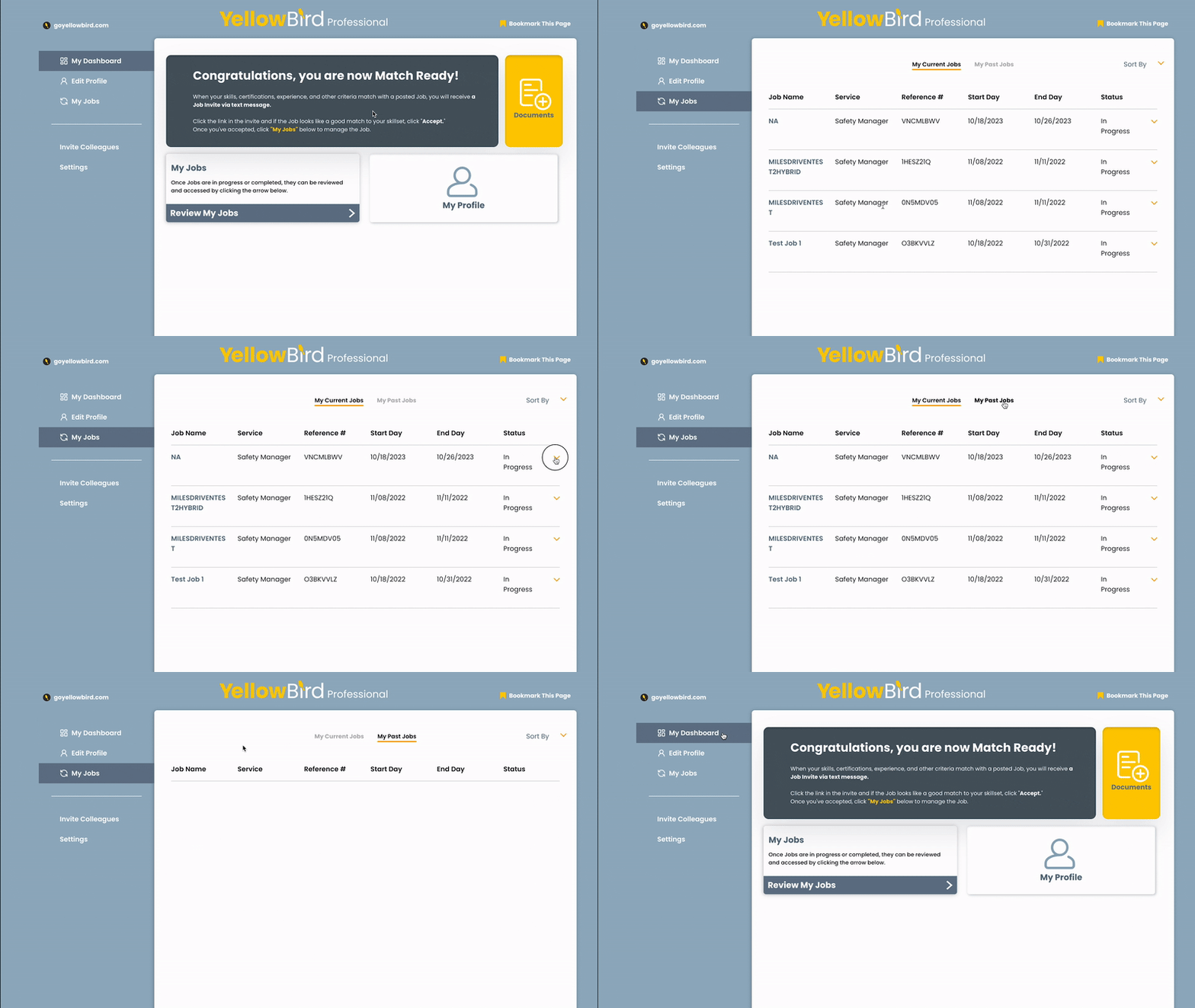
Review your current or past jobs in the My Jobs section of the Dashboard.

Invite colleagues or peers to join YellowBird and earn a referral fee!

Edit your Settings quickly using the left sidebar selection.
Have a question or need customer support? Please contact operations@goyellowbird.com.